Tile: Making Things Findable
- 4.7
- Rating
- 10.00M
- Installs
- Free
- Price

 Analysis by App-foxy
I have used Tile: Making Things Findable as a practical safety net for the objects that tend to disappear at the worst possible moment. It is a free lifestyle app from Tile Inc. that connects with compatible Bluetooth trackers, helping me locate items such as keys, wallets, bags, and a misplaced phone. The idea is simple, but the usefulness depends on how consistently I attach a tracker, keep Bluetooth available, and understand what the app can and cannot do.
What I like most is that it turns a stressful search into a short routine. Instead of emptying every drawer or retracing an entire morning, I can open the app, select an item, and check whether it is nearby. That does not make every lost object magically recoverable, but it gives everyday belongings a clear place in one system. For people who regularly leave things in unusual places, that small change in habit can be more valuable than a collection of clever features.
How Tile feels in its current form
Tile is best understood as the control center for Bluetooth trackers rather than a standalone locator that works without any accessories. The app is free to download and is rated for Everyone, while optional in-app purchases range from $2.99 to $99.99 per item. I would therefore separate the cost of the app from the cost of building a useful tracking setup: the software is accessible, but the full experience depends on having compatible hardware.
You May Also Like

 Blood Strike: 2.5 Anniversary
Blood Strike’s Loadouts Turn Every Drop Into a Tactical Gamble
A close look at Blood Strike’s custom loadouts: how fast access to signature weapons reshapes its battle royale rhythm, rewards preparation, and narrows the gap between fights.

 Pandora - Music & Podcasts
Pandora’s Music Is Easy to Start, but Harder to Recover
Pandora’s strength is its low-effort path from a seed to a station. Its weak spot is how much confidence it asks you to place in connection, setup, and quiet recovery.

 8 Ball Pool
 Is Built on Rivalries, Rematches, and Routine
A close look at the rivalries, rematches, shared routines, and unanswered safety questions that turn a quick pool match into a persistent mobile community.

 Samsung Music
’s Quiet Strength Is Playing What You Already Own
Its reach comes less from spectacle than from dependable access to a personal library. That simplicity is both the app’s strongest retention engine and its ceiling.

 AccuWeather: Weather Radar
AccuWeather Review: A Quick, Clear Forecast for Everyday Decisions
For everyday plans, the best forecast is the one you can understand quickly. AccuWeather makes rain timing, radar, and local conditions easy to act on, with a few trade-offs.

 Hill Climb Racing
Why Hill Climb Racing Still Turns Crashes Into One More Run
A tiny car, a bumpy hill and one more upgrade: Hill Climb Racing keeps resurfacing because its simple chaos makes every near-miss feel personal.
More From Our News Desk



The current version is 2.141.0, and the app supports a minimum operating system of 9. That makes it approachable for people who are not using the newest phone, although the practical experience can still vary with the phone model, Bluetooth behavior, battery settings, and the condition of the tracker itself. Tile Inc. has built a mature product here, not a novelty tool, and the app’s strong 4.8 average from around 262 thousand ratings reflects that many people find the basic workflow dependable.
Its reach is also substantial, with over 10 million installs. I do not treat popularity as proof that every user will be satisfied, but it does suggest that the app has become familiar to a wide range of people who want help with everyday belongings. The free entry point is useful for trying the interface before deciding whether a tracker fits your routine.
The basic search workflow is deliberately uncomplicated
After setting up a tracker, I can give it a recognizable name and associate it with a particular possession. That naming step matters more than it first appears. “Keys,” “work bag,” or “spare wallet” is much more useful during a rushed search than a vague device label. I recommend assigning names based on the object’s role, especially if several trackers are used in the same household.
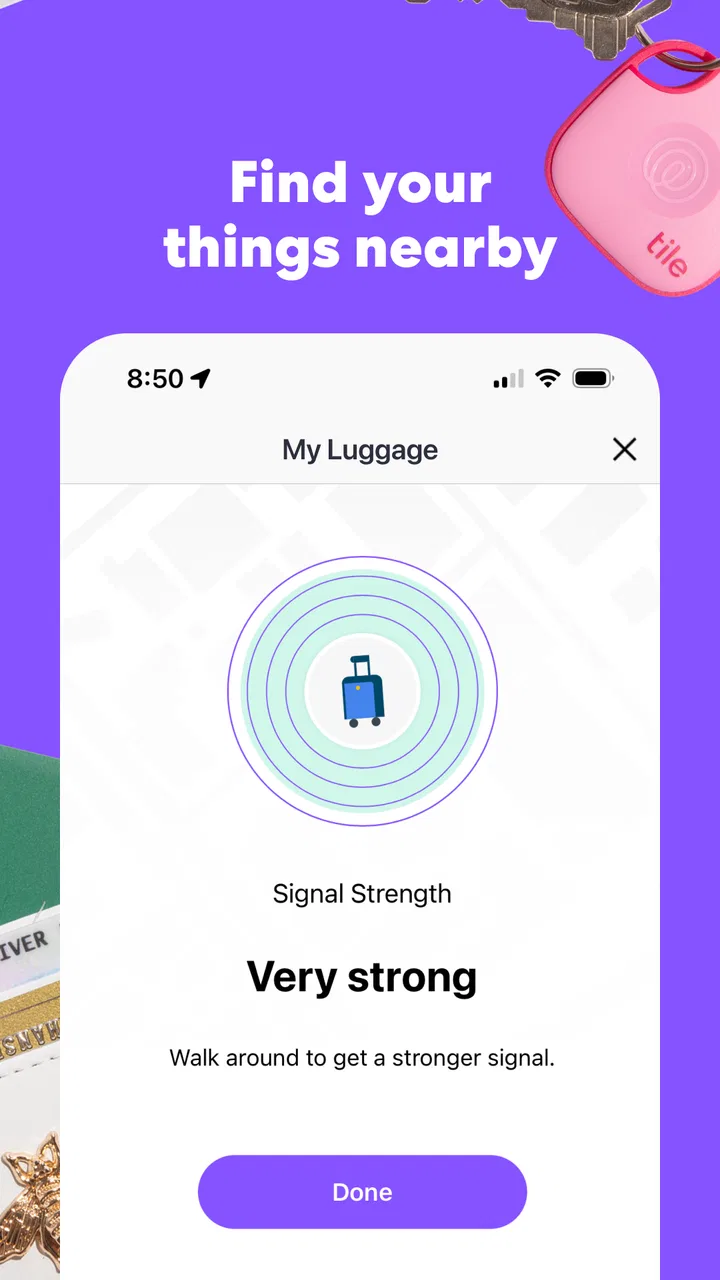
When an item is nearby, the app can help me check its connection and trigger the tracker’s sound. This is most helpful in familiar situations: keys under a coat, a wallet between sofa cushions, or a bag left in another room. The phone becomes a remote control for a small audible clue. It is not a replacement for looking carefully, but it narrows the search and reduces the temptation to buy a replacement before checking one more place.
The reverse search is equally useful. If I have the tracker but cannot find my phone, I can use the tracker to make the phone respond, provided the relevant connection is available. That two-way relationship is one of Tile’s strongest everyday advantages. Many people think of a tracker only as a way to find keys, yet the phone-finding shortcut can save just as much time.
A realistic morning example
Imagine that I am leaving for work and cannot find my wallet. I open Tile, choose the wallet entry, and check whether the app can communicate with the tracker. If the wallet is somewhere in the apartment, the sound gives me a direction. I might discover it inside yesterday’s jacket rather than searching every room. If the app cannot reach it, that result is still useful: I know the wallet may not be close enough for the immediate sound-based search, so I can stop wasting time in the same small area.
The important habit is to use the app before panic takes over. I would not wait until I am already late to discover that a tracker has a depleted battery, that Bluetooth is disabled, or that the item was left outside the nearby range. A quick occasional check of the tracker list and the phone’s connection settings makes the emergency workflow much smoother.
Where the network changes the recovery process
A nearby Bluetooth connection is the clearest use case, but a lost item may be somewhere I cannot reach directly. Tile’s wider finding approach can be helpful when another participating device encounters the tracker, allowing its location to become useful even when my own phone is not close to it. I see this as a recovery aid rather than a guarantee. It works best in places with plenty of people and compatible devices, while a tracker left in a quiet rural area may not receive the same help.
This creates an important trade-off. The app can be more useful than a simple key finder that only works inside my home, but I should not treat the community-assisted location as a live, continuous map. A location update can help me understand where to start looking, yet it may not tell me exactly where the object is at this moment. That distinction is easy to miss when someone is imagining a tracker as a miniature real-time GPS device.
For a phone left in a café, a bag forgotten in a car, or keys dropped along a busy route, the broader finding system may improve the odds of recovery. For a tracker that has been separated from its owner in an isolated place, expectations should be lower. I would choose Tile for the balance between local Bluetooth searching and wider recovery assistance, not because it eliminates uncertainty.
Small setup choices that make a real difference
My first practical recommendation is to name every tracker immediately and use names that describe the object, not the tracker. This prevents confusion when several entries appear together. My second is to attach the tracker where it will remain with the item. A loose tracker in a bag pocket can be removed along with the contents, while a securely placed tracker is more likely to stay with the thing I actually want to recover.
I also prefer to test the sound and connection soon after setup. A tracker that works in a calm room is easier to trust later. This test can reveal that the item is stored behind furniture, that the sound is difficult to hear, or that the phone’s Bluetooth behavior needs attention. It is a simple check, but it is more useful than discovering a problem during a rushed departure.
Another non-obvious use is separating “daily risk” from “occasional risk.” I would put a tracker on keys or a work bag if I handle them constantly, but I might not need one for every possession in the house. A smaller, carefully chosen setup is easier to maintain and less confusing than a long list of rarely used trackers. Tile works best when it supports a few important routines rather than becoming another collection of neglected devices.
What the current release means for established users
For someone already using Tile, version 2.141.0 is best approached as the current point in an ongoing product rather than a reason to reinvent every setup. Existing users should open the app after updating, confirm that their tracker names and item associations still make sense, and test one nearby search. That quick review is especially worthwhile for people who rely on the app for travel bags, medication cases, or work equipment.
I would also use the current release as an opportunity to tidy the tracker list. Remove old associations that no longer reflect reality, rename ambiguous entries, and check the items that matter most. This is not glamorous maintenance, but it improves the moment-to-moment experience. A locator app is only as clear as its list when I am under pressure.
The product’s evolution is visible less in a single dramatic change than in the way the app has grown into a familiar management layer for a large tracker ecosystem. Tile Inc. released the app on December 16, 2014, and the current version shows that this is a long-running service rather than a newly assembled utility. I would still distinguish that history from a promise about future updates: established software can continue to improve, but users should judge the present workflow on what it does today.
Where Tile is stronger than ordinary alternatives
The usual alternative is simply not using a tracker. That costs nothing, but it leaves me dependent on memory, repeated searching, and the hope that I notice a missing item quickly. A basic Bluetooth key finder may offer a similar nearby alarm, yet Tile’s dedicated app makes the setup feel more organized when several belongings need attention.
Tile is also more practical than a GPS device for small everyday objects when I mainly need short-range help and occasional recovery assistance. A GPS-based product may be more appropriate for continuous location needs, but it generally belongs to a different category of device and use case. I would not choose Tile to monitor a moving vehicle or obtain constant independent positioning. I would choose it for keys, bags, wallets, and similar possessions where a compact Bluetooth tracker is enough.
Compared with relying on a phone’s built-in device-finding service, Tile has a different focus. Phone-finding tools are excellent when the lost object is the phone itself, while Tile gives me a consistent place to manage tagged physical items. The reverse phone-finding function helps close that gap, making the app more useful than a one-direction accessory.
Limitations I would consider before installing it
The largest limitation is dependence on the tracker and the surrounding connection conditions. Installing the app alone does not make an untagged wallet or set of keys visible. If the tracker is not attached securely, has a depleted battery, or is outside useful Bluetooth range, the app cannot overcome that physical problem.
Sound-based searching also has obvious boundaries. A tracker hidden under clothing, inside a crowded bag, or in a noisy environment may be difficult to hear. I would treat the sound as a prompt to guide my eyes and hands, not as a guarantee that I will immediately identify the exact hiding place.
People who want continuous, independent location tracking should look elsewhere. Tile is not the right choice for someone expecting a live GPS-style trail, nor is it ideal for anyone unwilling to maintain a tracker attachment and occasionally verify that the system still works. It may also feel unnecessary if I rarely misplace possessions and already have a simple, reliable organization habit.
There is also a psychological limitation: a tracker can encourage overconfidence. If I assume every lost item will be recoverable, I may delay sensible actions such as retracing my route, contacting a venue, or protecting accounts and cards after losing a wallet. I see Tile as an extra layer of help, not insurance against every consequence of loss.
Who should use it and who should skip it
I would recommend Tile to commuters, students, frequent travelers, parents managing several bags, and anyone who repeatedly searches for the same everyday objects. It is particularly suitable for people who want a straightforward app rather than a complicated technical project. The free app makes it easy to explore the interface, while the broad install base and high average rating suggest that the core concept has connected with many users.
I would be more cautious for someone who needs guaranteed location updates in remote areas, wants to track a person, or expects the app to work without a compatible physical tracker. I would also skip it if the added hardware would create more maintenance than convenience. A tracking system is valuable only when the user remembers to carry it and keeps the item association accurate.
Families should decide in advance which objects deserve trackers. Putting one on every possession can make the list noisy and weaken the benefit of quick identification. A focused approach—keys, a primary bag, a wallet, or a travel case—keeps the app useful without turning a simple search into a catalog-management task.
What I would watch as the product continues
For future use, I would watch how smoothly the app handles larger collections of trackers, changing phones, and the everyday reliability of finding items beyond my immediate Bluetooth range. Those are the areas that determine whether Tile remains a calm, dependable tool or becomes something I remember only after an item has already disappeared.
I would also pay attention to how clearly the app communicates the difference between a nearby connection and a location reported through the wider finding network. That distinction affects decisions, especially when a user is trying to recover something valuable or time-sensitive. Clear status information is more important than decorative additions because it helps me choose the right next action.
Finally, I would keep an eye on the balance between the free experience and optional purchases. The app is free, but the broader setup involves hardware and possible in-app purchases priced from $2.99 to $99.99 per item. That range makes it important to decide whether I am solving one recurring problem or building a larger tracking system. For a single troublesome set of keys, the investment may be easy to justify; for many belongings, I would compare the total cost with simpler alternatives.
My overall view is positive, with realistic expectations. Tile gives ordinary objects a useful digital identity and makes the first few minutes of a search far less chaotic. Its best qualities are the simple nearby search, the reverse phone-finding option, and the possibility of help beyond my own phone. Its weaknesses come from the physical limits of Bluetooth, dependence on compatible trackers, and the fact that wider-network recovery is assistance rather than certainty.
If you often misplace keys, wallets, bags, or your phone, I think Tile is worth trying. I would start with one important item, give it a clear name, test the sound, and learn how the connection behaves in my normal environment. The best reason to use Tile is not that it promises perfect recovery; it is that it gives me a sensible first move when memory and hurried searching fail.
FAQs for Tile: Making Things Findable
01What is Tile and how does it work?
Tile is a Bluetooth-enabled device that helps locate lost items such as keys, wallets, or even your phone. By attaching a Tile to your belongings, you can track them using the Tile app on your smartphone. The app displays the last known location of your item on a map, and you can make the Tile emit a sound to find it more easily.
02Is a subscription required to use Tile?
While you can use basic Tile features without a subscription, Tile also offers a premium service. The subscription includes extra features like Smart Alerts, which notify you if you leave home without your Tile-tagged items, and a 30-day location history. It's an optional upgrade for enhanced functionality.
03What is the battery life of a Tile, and can it be replaced?
The battery life of a Tile varies by model. Most Tiles have a battery life of about one year. Some models have replaceable batteries, while others are designed to be disposable and require purchasing a new Tile when the battery runs out. The app will notify you when it's time to replace or upgrade your Tile.
04How accurate is the location tracking in the Tile app?
The accuracy of Tile's location tracking depends on the strength of the Bluetooth connection and the proximity to your phone. In open spaces, it can track items up to 200 feet away. However, obstacles like walls can affect the range. For more precise tracking, the app integrates with a large community network to help locate items further away.
05Can Tile be used internationally?
Yes, Tile can be used internationally. The device relies on Bluetooth and GPS, which work globally. Keep in mind that the app requires an internet connection to update the location data, so having mobile data or Wi-Fi access is essential when traveling abroad. This ensures seamless tracking of your items no matter where you are.
Pros
- User-friendly interface for easy navigation.
- Seamless integration with smart devices.
- Customizable alerts for better tracking.
- Long battery life ensures reliability.
- Supports multiple languages for global users.
Cons
- Requires constant internet connection.
- Limited features in free version.
- Battery drain on connected devices.
- Subscription model can be pricey.
- No offline tracking capabilities.

Tile: Making Things Findable
Gallery